
1.2.4. web2py アプリケーションと AWS RDS の接続
web2py アプリケーションの設定とデプロイ にて、Beanstalk に web2py アプリケーションのデプロイを行いました。 しかし、このアプリケーションは EC2 インスタンスの SQLite データベースを利用しているに過ぎません。
ここでは、 AWS RDS への接続を試してみます。
1.2.4.1. RDS 接続に必要な情報の確認
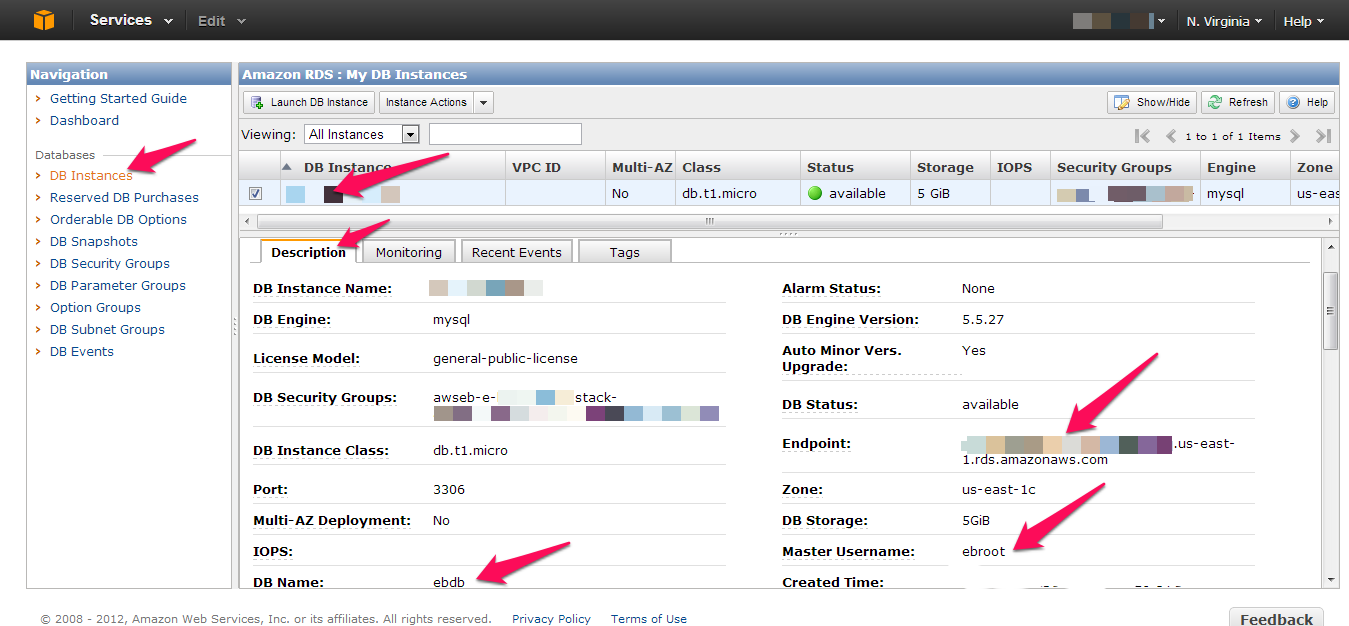
Benastalk 初期設定(eb init コマンド) にて、RDS DB インスタンスの生成を行う設定にしました。 このため、Beanstalk サービスがスタートした時点で、DBインスタンスが立ち上がっているはずです。 AWS マネジメントコンソール で、 DBインスタンスの情報を見てみましょう。
RDS サービス画面
RDS サービス画面を開き、「DB Instances」をクリックし、アプリケーションに接続するDBインスタンス を選択します。「Description」タブの DB Endpoint と Master Username DB Name を確認します。
1.2.4.2. RDS への接続記述を web2py アプリケーションに追加
web2py アプリケーションのモデル記述(db.py)を次のように修正してください。
修正前
if not request.env.web2py_runtime_gae:
    ## if NOT running on Google App Engine use SQLite or other DB
    db = DAL('sqlite://storage.sqlite')
else:
    ## connect to Google BigTable (optional 'google:datastore://namespace')
    db = DAL('google:datastore')
    ## store sessions and tickets there
    session.connect(request, response, db=db)
    ## or store session in Memcache, Redis, etc.
    ## from gluon.contrib.memdb import MEMDB
    ## from google.appengine.api.memcache import Client
    ## session.connect(request, response, db = MEMDB(Client()))
SQLite の記述をコメントにし、DBインスタンスが MySQL の場合は次のように記述します。
if not request.env.web2py_runtime_gae:
    ## if NOT running on Google App Engine use SQLite or other DB
    #db = DAL('sqlite://storage.sqlite')
    db = DAL('mysql://ebroot:********@xxxxxxxxxxxxxxx.xxxxxxxxx.us-east-1.rds.amazonaws.com/ebdb')

else:
    ## connect to Google BigTable (optional 'google:datastore://namespace')
    db = DAL('google:datastore')
    ## store sessions and tickets there
    session.connect(request, response, db=db)
    ## or store session in Memcache, Redis, etc.
    ## from gluon.contrib.memdb import MEMDB
    ## from google.appengine.api.memcache import Client
    ## session.connect(request, response, db = MEMDB(Client()))
つまり DALコンストラクタの接続文字列は、MySQL の場合、次の形式で指定します。
mysql://[Master Username]:[パスワード]@[DB Endpoint]/[DB Name]
1.2.4.3. web2py アプリケーションをデプロイ
後は、Gitコマンドでリポジトリに反映し、
C:\web2py>git commit -m "test code"AWSサーバにプッシュします。
C:\web2py>git aws.pushデプロイ完了後、動作を確認してください。
1.2.4.4. 注意点など
- Beanstalk サービスで生成された DBインスタンスは、必要な DB Security Groups の設定が完了しています。 もし既存のDBインスタンスに接続する場合は、別途 DB Security Groups の設定を行なってください。
- マイグレーションの失敗で、アプリケーションが動作しない場合があります。 このような時には、
migrate=Falseを指定して実行するようにしてください。 また問題発生時はfake_migrate=Trueを指定し、問題解消後fake_migrate=Falseにしてください。